Showing posts with label Integration. Show all posts

Retrive data from table by select tag for dropdownlist using hibernate and struts2 integration in eclipse and oracle

Create Database Table named EntranceAction and insert data using insert sql command.


Don't forget to commit after insert data into table

Project View After Completion
Hibernate and Struts2 Setting
right click over project on Project Explorer and goto properties->Java Build Path->Libraries
Add Required Hibernate, struts jars, JRE system Library, Apache Tomcat server by click on Add Library and Add External Jar ojdbc14.jar by click on Add External Jars.

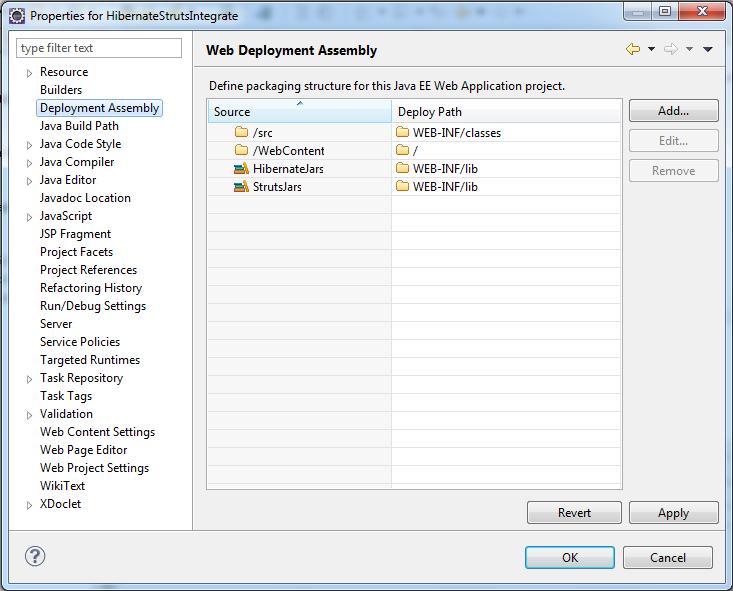
Properties->Web Deployment Assembly->Add->Java Build Path Entries->next
Select HibernateJars and StrutsJars and click finish


ddlAction.java
This is a POJO class and it is working as Persistent class for Hibernate and action class for Struts.
 package org.ddl;  
 import com.opensymphony.xwork2.ActionSupport;  
 import java.util.List;  
 import org.ea.EntranceAction;  
 import org.hibernate.Query;  
 import org.hibernate.Session;  
 import org.hibernate.SessionFactory;  
 import org.hibernate.Transaction;  
 import org.hibernate.cfg.Configuration;  
 
 public class ddlAction extends ActionSupport  
 {  
 private List<EntranceAction> examsid;  
   public List<EntranceAction> getExamsid() {  
     return examsid;  
   }  
   public void setExamsid(List<EntranceAction> examsid) {  
     this.examsid = examsid;  
   }  
   @SuppressWarnings("deprecation")  
      public String execute() throws Exception  
   {  
          Session session = null;  
            SessionFactory factory= new Configuration().configure().buildSessionFactory();  
             session = factory.openSession();  
       Transaction tc=session.beginTransaction();  
       Query query=session.createQuery("select examid from EntranceAction");  
       examsid=query.list();  
       
       tc.commit();  
       session.close();  
       return "examsid";  
     }  
   }  

EntranceAction.java
 package org.ea;  
 public class EntranceAction   
 {    
 private String examid;  
 public String getExamid() {  
      return examid;  
 }  
 public void setExamid(String examid)  
 {  
 this.examid=examid;  
 }  
 }  

login.jsp
This is page for user's view and here we using struts tags and on submit action is ddl.
 <%@ page language="java" contentType="text/html; charset=ISO-8859-1"  
   pageEncoding="ISO-8859-1"%>  
 <%@ taglib prefix="s" uri="/struts-tags" %>  
 <!DOCTYPE html PUBLIC "-//W3C//DTD HTML 4.01 Transitional//EN" "http://www.w3.org/TR/html4/loose.dtd">  
 <html>  
 <head>  
 <meta http-equiv="Content-Type" content="text/html; charset=ISO-8859-1">  
 <title></title>  
 </head>  
 <body>  
 <h1></h1>  
 <s:form action="ddl">  
 <s:submit value="GO"/>  
 <%-- <a href="ddl.action">register</a>--%>  
 </s:form>  
 </body>  
 </html>  

struts.xml
This file contains information about which action class to be invoked. here we are invoking ddlAction class using action name ddl present in login.jsp's page form tag on submit button click.
 <?xml version="1.0" encoding="UTF-8"?>  
 <!DOCTYPE struts PUBLIC  
   "-//Apache Software Foundation//DTD Struts Configuration 2.0//EN"  
   "http://struts.apache.org/dtds/struts-2.0.dtd">  
   <struts>  
   <package name="log" namespace="/" extends="struts-default">  
   <action name="ddl" class="org.ddl.ddlAction" method="execute">  
   <result name="examsid">/ddl.jsp</result>  
   <result name="error">/login.jsp</result>  
   </action>  
   </package>  
   </struts>  

web.xml
 <?xml version="1.0" encoding="UTF-8"?>  
 <web-app xmlns:xsi="http://www.w3.org/2001/XMLSchema-instance" xmlns="http://java.sun.com/xml/ns/javaee" xmlns:web="http://java.sun.com/xml/ns/javaee/web-app_2_5.xsd" xsi:schemaLocation="http://java.sun.com/xml/ns/javaee http://java.sun.com/xml/ns/javaee/web-app_2_5.xsd" id="WebApp_ID" version="2.5">  
  <display-name>ProjDropdownlist</display-name>  
  <welcome-file-list>  
     <welcome-file>login.jsp</welcome-file>  
  </welcome-file-list>  
  <filter>  
    <filter-name>struts2</filter-name>  
    <filter-class>  
      org.apache.struts2.dispatcher.FilterDispatcher  
    </filter-class>  
   </filter>  
   <filter-mapping>  
    <filter-name>struts2</filter-name>  
    <url-pattern>/*</url-pattern>  
   </filter-mapping>  
 </web-app>  

ddl.jsp
This is page for user's view and here we using struts tags for select tag showing data in the form of dropdownlist retrieve from database table EntranceAction.
 <%@ page language="java" contentType="text/html; charset=ISO-8859-1"  
   pageEncoding="ISO-8859-1"%>  
   <%@ taglib prefix="s" uri="/struts-tags" %>  
 <!DOCTYPE html PUBLIC "-//W3C//DTD HTML 4.01 Transitional//EN" "http://www.w3.org/TR/html4/loose.dtd">  
 <html>  
 <head>  
 <meta http-equiv="Content-Type" content="text/html; charset=ISO-8859-1">  
 <title></title>  
 </head>  
 <body>  
   
 <s:select name="courseinterested" label="Course Interested" list="examsid"/>  
 
 </s:form>
 </body>  
 </html>  

hibernate.cfg.xml
This is a file that contains information about Oracle database(or any other database you want to use) Driver and connection information and mapping class information. 
In place of Annotations we are using .hbm file
 <?xml version="1.0" encoding="UTF-8"?>  
 <!DOCTYPE hibernate-configuration PUBLIC  
 "-//Hibernate/Hibernate Configuration DTD//EN"  
 "http://hibernate.sourceforge.net/hibernate-configuration-3.0.dtd">  
 <hibernate-configuration>  
 <session-factory>  
   <property name="hibernate.connection.driver_class">oracle.jdbc.OracleDriver</property>  
   <property name="hibernate.connection.url">jdbc:oracle:thin:@localhost:1521:xe</property>  
   <property name="hibernate.connection.username">hr</property>  
   <property name="hibernate.connection.password">hr</property>  
   <property name="hibernate.connection.pool_size">10</property>  
   <property name="show_sql">true</property>  
   <property name="dialect">org.hibernate.dialect.OracleDialect</property>  
   <property name="hibernate.hbm2ddl.auto">update</property>  
   <mapping resource="hibernate.hbm.xml"/>  
     
 </session-factory>  
 </hibernate-configuration>  

hibernate.hbm.xml
hibernate mapping file which we are using to relate our database table to project's object.
 <?xml version="1.0" encoding="UTF-8"?>  
 <!DOCTYPE hibernate-mapping PUBLIC "-//Hibernate/Hibernate Mapping DTD 3.0//EN" "http://hibernate.sourceforge.net/hibernate-mapping-3.0.dtd">  
 <hibernate-mapping>  
  <class name="org.ea.EntranceAction" table="EntranceAction">  
    <id name="examid" column="examsid">  
      <generator class="assigned"/>  
      </id>  
    </class>  
 </hibernate-mapping>  

Output:


Hibernate Struts Integration using Eclipse, Oracle and Hibernate Annotations

In this Tutorial we are creating database table and inserting data into that table using Jsp page, Hibernate and Struts Framework Integration.
Project View After Completion

Hibernate and Struts2 Setting
right click over project on Project Explorer and goto properties->Java Build Path->Libraries
Add Required Hibernate, struts jars, JRE system Library, Apache Tomcat server by click on Add Library and Add External Jar ojdbc14.jar by click on Add External Jars.
For Details Read How to set Struts2 Environment  and How to set Hibernate Environment

Properties->Web Deployment Assembly->Add->Java Build Path Entries->next
Select HibernateJars and StrutsJars and click finish
EmployeeEntry.jsp
This is page for user's input and here we using struts tags and on submit action is hello.
 <%@ page language="java" contentType="text/html; charset=ISO-8859-1"  
   pageEncoding="ISO-8859-1"%>  
   <%@ taglib prefix="s" uri="/struts-tags"%>  
 <!DOCTYPE html PUBLIC "-//W3C//DTD HTML 4.01 Transitional//EN" "http://www.w3.org/TR/html4/loose.dtd">  
 <html>  
 <head>  
 <meta http-equiv="Content-Type" content="text/html; charset=ISO-8859-1">  
 <title>Insert title here</title>  
 </head>  
 <body>  
 <s:form action="hello">  
 <s:textfield name="emp_name" label="Employee Name:"/>  
 <s:textfield name="emp_sal" label="Employee Salary:"/>  
 <br/>  
 <s:token/>  
 <s:submit value="Insert" />  
 </s:form>  
 </body>  
 </html>  

EmpSuccess.jsp
This is a success page that displays success message on successful data entry into database table.
 <%@ page language="java" contentType="text/html; charset=ISO-8859-1"  
   pageEncoding="ISO-8859-1"%>  
 <!DOCTYPE html PUBLIC "-//W3C//DTD HTML 4.01 Transitional//EN" "http://www.w3.org/TR/html4/loose.dtd">  
 <html>  
 <head>  
 <meta http-equiv="Content-Type" content="text/html; charset=ISO-8859-1">  
 <title>Success</title>  
 </head>  
 <body>  
 <h1> Data Entered Successfully</h1>  
 </body>  
 </html>  

EmployeeData.java
This is a POJO class and it is working as Persistent class for Hibernate and action class for Struts and the same java class we are using to store object of EmployeeData class using Hibernate Framework.
we are also using Annotations such as @Entity,@table,@Id etc.
If we don't use Hibernate Annotations in our project then we have to create mapping file(.hbm file)
 package org.webideaworld.integrate;  
 import javax.persistence.Entity;  
 import javax.persistence.GeneratedValue;  
 import javax.persistence.Id;  
 import javax.persistence.Table;  
 import org.hibernate.Session;  
 import org.hibernate.SessionFactory;  
 import org.hibernate.Transaction;  
 import org.hibernate.cfg.Configuration;  
 import com.opensymphony.xwork2.ActionSupport;  
 @Entity  
 @Table(name="EmployeeData")  
 public class EmployeeData extends ActionSupport{  
      @Id  
      @GeneratedValue  
      private int id;  
      private String emp_name;  
      private int emp_sal;  
      public int getId() {  
           return id;  
      }  
      public void setId(int id) {  
           this.id = id;  
      }  
      public String getEmp_name() {  
           return emp_name;  
      }  
      public void setEmp_name(String emp_name) {  
           this.emp_name = emp_name;  
      }  
      public int getEmp_sal() {  
           return emp_sal;  
      }  
      public void setEmp_sal(int emp_sal) {  
           this.emp_sal = emp_sal;  
      }  
      public String execute() throws Exception{  
           @SuppressWarnings("deprecation")  
           SessionFactory factory= new Configuration().configure().buildSessionFactory();  
           Session session = factory.openSession();  
           EmployeeData ed=new EmployeeData();  
           //sp.setId(01);  
           ed.setEmp_name(getEmp_name());  
           ed.setEmp_sal(getEmp_sal());  
           Transaction tx = session.beginTransaction();  
           int i=(Integer)session.save(ed);  
           tx.commit();  
           session.close();  
           factory.close();  
           if(i>0)  
           return SUCCESS;  
           else  
           return ERROR;  
      }  
 }  

hibernate.cfg.xml
This is a file that contains information about Oracle database(or any other database you want to use) Driver and connection information and mapping class information.
 <?xml version="1.0" encoding="UTF-8"?>  
 <!DOCTYPE hibernate-configuration PUBLIC  
 "-//Hibernate/Hibernate Configuration DTD//EN"  
 "http://hibernate.sourceforge.net/hibernate-configuration-3.0.dtd">  
 <hibernate-configuration>  
 <session-factory>  
   <property name="hibernate.connection.driver_class">oracle.jdbc.OracleDriver</property>  
   <property name="hibernate.connection.url">jdbc:oracle:thin:@localhost:1521:xe</property>  
   <property name="hibernate.connection.username">hr</property>  
   <property name="hibernate.connection.password">hr</property>  
   <property name="hibernate.connection.pool_size">10</property>  
   <property name="show_sql">true</property>  
   <property name="dialect">org.hibernate.dialect.OracleDialect</property>  
   <property name="hibernate.hbm2ddl.auto">update</property>  
   <mapping class="org.webideaworld.integrate.EmployeeData" />  
 </session-factory>  
 </hibernate-configuration>  

struts.xml
This file contains information about which action class to be invoked. here we are invoking EmployeeData action class using action name hello present in EmployeeEntry.jsp's page form tag on submit button click.
 <?xml version="1.0" encoding="UTF-8"?>  
 <!DOCTYPE struts PUBLIC  
   "-//Apache Software Foundation//DTD Struts Configuration 2.0//EN"  
   "http://struts.apache.org/dtds/struts-2.0.dtd">  
 <struts>  
 <constant name="struts.devMode" value="true" />  
 <package name="helloworld" extends="struts-default">  
  <action name="hello" class="org.webideaworld.integrate.EmployeeData" method="execute">  
 <result name="success">/EmpSuccess.jsp</result>  
 <result name="error">/EmployeeEntry.jsp</result>  
 <result name="input">/EmployeeEntry.jsp</result>  
    </action>  
   </package>  
 </struts>       

web.xml
 <?xml version="1.0" encoding="UTF-8"?>  
 <web-app xmlns:xsi="http://www.w3.org/2001/XMLSchema-instance" xmlns="http://java.sun.com/xml/ns/javaee" xmlns:web="http://java.sun.com/xml/ns/javaee/web-app_2_5.xsd" xsi:schemaLocation="http://java.sun.com/xml/ns/javaee http://java.sun.com/xml/ns/javaee/web-app_2_5.xsd" id="WebApp_ID" version="2.5">  
  <display-name>HibernateStrutsIntegrate</display-name>  
  <welcome-file-list>  
    <welcome-file>EmployeeEntry.jsp</welcome-file>  
   </welcome-file-list>  
   <filter>  
    <filter-name>struts2</filter-name>  
    <filter-class>  
      org.apache.struts2.dispatcher.FilterDispatcher  
    </filter-class>  
   </filter>  
   <filter-mapping>  
    <filter-name>struts2</filter-name>  
    <url-pattern>/*</url-pattern>  
   </filter-mapping>  
 </web-app>  

Output: