Showing posts with label Database. Show all posts

Unlock Database User Account in Oracle 10g XE using SQL Command Line

Following are the Steps that how we can unlock any Database User Account(eg. HR).
Before Unlocking any user account that user must be in the Database and must be Locked and to unlock that user you need DBA(Database Administrator) Privileges that's why I firstly connected as SYSDBA.

Press win+R( For Run) and type cmd then ok.then you need to write SQLPLUS/NOLOG as shown below to reach SQL Command Line.
OR
you can directly go to SQL Command Line
Start-> All programs-> Oracle 10g Express Edition -> Run SQL Command Line
Why we need to Unlock HR User:
When you try to work(eg. create table) with HR User First Time then you wouldn't be able to connect HR User because by default it remains Locked that's why we need to unlock it.

you can also see this error while connecting to HR Locked Account.
"Error,account is locked,Warning, you no longer connected to Oracle"
 C:\>SQLPLUS/NOLOG  
 SQL>CONN/AS SYSDBA  
 connected  
 SQL>CONN HR/HR  
 Error,account is locked  
 warning,you no longer connected to oracle  
 SQL>CONN/AS SYSDBA  
 connected  
 SQL>ALTER USER HR IDENTIFIED BY HR;  
 user altered  
 SQL>ALTER USER HR ACCOUNT UNLOCK;  
 user altered  
 SQL>ALTER USER HR IDENIFIED BY HR ACCOUNT UNLOCK;  
 user altered  
 SQL>CONN HR/HR  
 connected    

How to use Foreign Key and other Constraint in Oracle 10g XE

Foreign key is a non-key attribute which depends on a Primary key column of another table.

Here in below given example in table EMPL, DEPTID is foreign key column and there is another table named DEPTL which is Primary key table and DEPTID
is Primary Key Column.

If Foreign Key is present in same Primary Key table then it called Self Referential Integrity.

Primary Key and Unique Key both uniquely define a tuple(Row).
but the difference is that Primary key can't take null values and Unique Key can take Multiple null values.

Step 1: Create a Primary Key table DEPTL with DEPTID as Primary Key Column.


 CREATE TABLE DEPTL(DEPTID NUMBER(4) PRIMARY KEY,DEPTNAME VARCHAR2(20))  

Step 2: Create a table EMPL


 CREATE TABLE EMPL(ID NUMBER(20) NOT NULL,EMAIL VARCHAR2(20) CONSTRAINT EMPL_EMAIL_UK UNIQUE,  
 SALARY NUMBER(8,2) CHECK(sALARY>1000),DEPTID NUMBER(4),  
 CONSTRAINT EMPL_ID_PK PRIMARY KEY(ID),  
 CONSTRAINT EMPL_DEPT_FK FOREIGN KEY(DEPTID)  
 REFRENCES DEPTL(DEPTID))  

NOTE: NOT NULL Constraint can't be apply as a Table Level Constraint.

How to work with Export and Import commands with Oracle Database

Following are the commands for performing Export and Import a backup file form one system to another by using command prompt. Here we are taking Oracle 10g express edition as an example.

Export command
  
 c:\users\Sone>EXP SYS/SYS TABLES=EMPLOYEES,DEPARTMENTS FILE=EXP1.DMP  
 USERNAME:SYS/SYS AS SYSDBA 


Export Manual way
  
 c:\users\Sone>EXP  
 USERNAME:HR/HR  
 Enter Array fetch buffer size:4096>4096  
 Export File:EXPDAT.DMP>EXP1.DMP  
 (2)U(sers),or(3)T(ables):(2)U>t  
 Export table data(yes/no):yes>y  
 Coompress extents(yes/no):yes>y  
 Table(T) or Partition(T:P) to be exported:(Return to quit)>EMPLOYEES,DEPARTMENTS  
 Export terminated successfully.  


Copy EXP1.DMP from Sone(System one) to Stwo(System two)

Import Command
 
 c:\users\Stwo>IMP SYS/SYS FILE=c:\users\Stwo\EXP1.DMP TABLES=EMPLOYEES,DEPARTMENTS FROMUSER=SYS  
 USERNAME:SYS/SYS AS SYSDBA  
 Import terminated successfully.  

NOTE: Here we are exporting dmp file from hr and sys schema but importing only in sys schema.It is because employees and departments tables are already present in hr schema.

How to Add and Drop Foreign Key and other Constraints in Oracle 10g XE

Foreign key is a non-key attribute which depends on a Primary key column of another table.

Here in below given example in table EMPL, DEPTID is foreign key column and there is another table named DEPTL which is Primary key table and DEPTID
is Primary Key Column.

If Foreign Key is present in same Primary Key table then it called Self Referential Integrity.

1: Adding Constraint After table created

ON DELETE SET NULL:sets child value null
ON DELETE CASCADE: Child row will delete

eg.
 ALTER TABLE EMPL ADD CONSTRAINT FOREIGN KEY EMPL_DEPTID_FK FOREIGN KEY(DEPTID) REFRENCES DEPTL(DEPTID) ON DELETE SET NULL 


 ALTER TABLE EMPL ADD CONSTRAINT FOREIGN KEY EMPL_DEPTID_FK FOREIGN KEY(DEPTID) REFRENCES DEPTL(DEPTID) ON DELETE CASCADE  


2: Dropping Constraint
ALTER TABLE TABLENAME CONSTRAINT CONSTRAINT-NAME

eg.
 ALTER TABLE EMPL DROP CONSTRAINT EMPL_DEPTID_FK  

Joins for SQL or Oracle Database


Joins: When We need to combine two or more tables from database then we use Joins.

Step 1: Here we are using Oracle 10g to execute oracle and sql commands. so run 'sql command line'
connect to hr schema.

Step 2: Two tables named Employees and Departments are already present in this schema and we are performing join over these two tables.
Employees Table:
Departments Table:
Following are the commands for Different Joins:
Cartesian Product:(for Oracle)

Cross Join:(for sql/oracle) :
 It is a join which does not include Where Clause and the result of this join is number of rows in First Table multiply by number of rows in Second Table.


Output of Cartesian Product and Cross join are same


Natural Join (Inner Join):
 It is a Join where exists at-least one column name in both the Tables and that get Implicitly Compared and if you are selecting that common column then there is no need to mention from which Table you are going to select that column(DEPARTMENT_ID is common column here)
but in the case of on clause we need to mention it(see Query E.DEPARTMENT_ID where E is Alias of table Employees)


Natural Join with Using Clause:

Natural Join with on Clause:

Equi Join:(For Oracle)
It is a Join Where comparison takes place Explicitly. E and D are Alias for Tables Employees and Departments respectively.
Example 1.

Example 2.


Outer Join: SQL
Left Outer Join:
Returns All Rows from Left Table whether corresponding values are available or not.

Right Outer Join:
Returns All Rows from Right Table whether corresponding values are available or not. 

Full Outer Join:
Returns All Rows from Right Table and Left Table whether corresponding values are available or not.


Outer Join: Oracle
Left Outer Join:

output:


Right Outer Join:
output:

Sql Default Constraint

When we need to set a Default Value for Particular Column,if user not want to enter a value for that column then we give it to a Default Constraint.

Example Shows Setting Default for Numeric value, Sysdate and Alpha-numeric Value.

 create table exam(  
 id number(6) Default 10,  
 Hdate date Default sysdate,  
 email varchar2(20) Default 'user@mail.com'  
 );  

Unlock Database user account and change User's Privileges in Oracle 10g XE with GUI

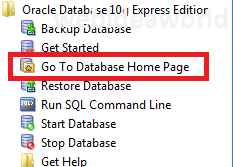
Step 1: (for Windows) Click on Start-> All programs-> Oracle 10g Express Edition
click on "Go To Database Home Page".


Step 2: In your default Browser, Oracle Database login Screen will pop out then Login with Admin Username and Password.


Step 3:Click on Administration.

Step 4:Click on Database Users.


Step 5:Click on HR or Another Database Users you want to Unlock or Change User Privileges.


Step 6: Select Account Status as "Unlocked" and give password for HR Account and check whatever Privileges you want to give this User and then click "Alter User".


Step 7:User Altered Screen.